
Surviving Statistics

Chapter 2: Descriptive Statistics—Frequencies

This chapter of Surviving Statistics introduces frequency distributions and shows how counts, percentages, cumulative frequencies, and class intervals help summarize data.

Start here

Overview

Learn how to organize raw data into useful frequency distributions for qualitative and quantitative variables, then connect those summaries with descriptive statistics and Excel tools.

What You Will Learn

  • Explain the purpose of a frequency distribution.
  • Create frequency and relative-frequency distributions for qualitative data.
  • Interpret cumulative frequencies and cumulative percentages.
  • Determine a reasonable number of classes for quantitative data.
  • Compute class width from the highest value, lowest value, and number of classes.
  • Use Excel tools such as PivotTables and COUNTIF to summarize data.
  • Use descriptive statistics to supplement a frequency distribution.

Before You Begin

  • Qualitative and quantitative variables.
  • Discrete and continuous variables.
  • Nominal, ordinal, interval, and ratio measurement scales.
  • Basic percentages and arithmetic.

Why This Matters

A frequency distribution is often the first useful summary of a data set. It reveals which values or categories occur most often, makes large data sets easier to interpret, and prepares the data for graphs and additional descriptive statistics.

Plan Your Study

  • Review variable types and measurement scales from Chapter 1.
  • Read how qualitative frequency distributions are constructed and interpreted.
  • Study the steps for selecting classes and class width for quantitative data.
  • Watch the chapter video and review the Excel examples.
  • Use the descriptive-statistics calculator with a small data set.
  • Download the Pay Survey workbooks and reproduce one frequency distribution in Excel.

Next step

Read the complete chapter.

The Learn tab contains the written lesson from Surviving Statistics.

Go to Learn

Written lesson

Learn Chapter 2: Descriptive Statistics—Frequencies

This chapter of Surviving Statistics introduces frequency distributions and shows how counts, percentages, cumulative frequencies, and class intervals help summarize data.

Advertisement

Descriptive Statistics – Frequencies

This chapter in Surviving Statistics introduces one aspect of descriptive statistics, frequency distributions. One of the first things you will want to do with your data is count the number of occcurences by category. This is what frequency distributions help you do.

Chapter Study Sheet

⬇
Printable Study Sheet Open or download

Instructional Videos

▶
Video - Lesson #2 Frequency Distributions Watch video
▶
Video - Business Statistics Describing Data Watch video

Surviving Statistics - File Downloads

⬇
Pay Survey with pay rate pivot table Open or download

⬇
Pay Survey with color test Open or download

Descriptive Statistics – Frequencies

One of the first questions to ask about collected data, and one of the easiest to answer, is “How many?” For example, “How many of the people we surveyed like our company’s candy bar better than our competitors when we allowed them to choose?” We can answer these questions by counting. The result of our counts become the frequency of occurrence. We can display the number that chose each candy bar in frequency distributions as tables, charts, or graphs.

Frequency Distributions of Categorical Variables

If the data you are using has categorical variables, frequency distributions summarize the counts of each category. For example, with the favorite color variable, a frequency distribution would show the number of each person surveyed (observations) who selected, red, blue, green, or other color.

FREQUENCY TABLE

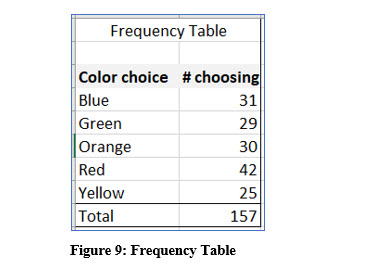
The frequency table in Figure 9 displays every possible choice for the variable and then the count for each. In all, 157 individuals were asked to select their favorite color from a set list of choices. The frequency table reports or describes, how many selected each color. When you create a frequency table, you should sort the category choices to make it easier to read.
Statistics lesson screenshot 2ndChapter1

Excel as a Calculator

As we progress through this text, we will eventually be doing mathematical computations. Using a calculator to perform those computations can be helpful. My preferred calculator is Excel. As we get into those computations, I will discuss the math behind the formula so you can compute it manually or with a calculator. I will also show you how to do the computation in Excel longhand, and when one is available, with an Excel shortcut. I will also assume you have some basic background in Excel. If you have not worked with Excel before, there are many tutorials and resources available on the web, including those I have created which are on my website and for sale at online booksellers.

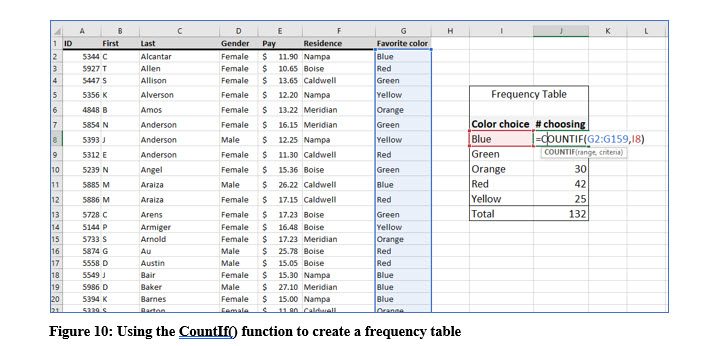
You can use Excel’s CountIf() to count the frequency of occurrence of one categorical value in a large list. You can see this illustrated in Figure 10.
Statistics lesson screenshot 2ndChapter2

BAR OR COLUMN CHART

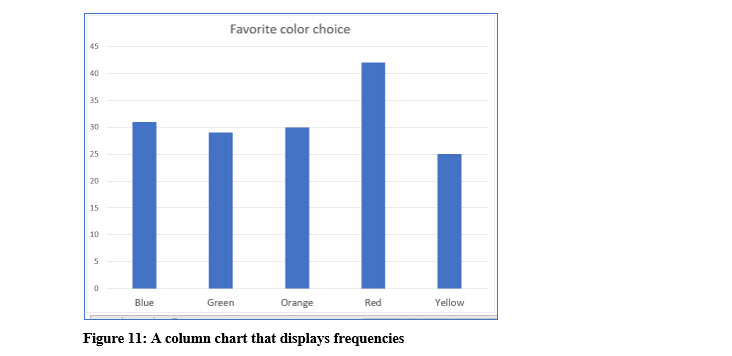
In addition to a table, frequency distributions can be displayed as a bar or column chart which provide a graphical representation of the frequencies.
Statistics lesson screenshot 2ndChapter3

You can easily create bar or column charts in Excel or other software.

PIE CHART

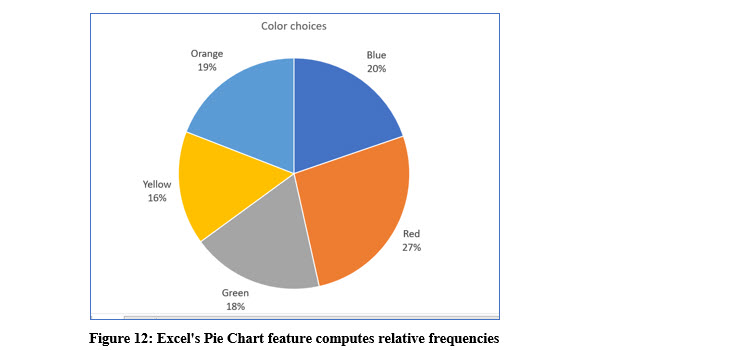
A pie chart is also an effective way to represent frequencies graphically. A pie chart has the advantage of showing how each color choice relates to the choices of all the colors. In other words, a pie chart shows the relative frequency of each choice (color).
Statistics lesson screenshot 2ndChapter4

Relative Frequencies

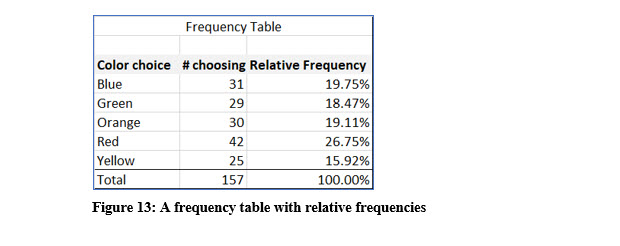
The pie chart shown in Figure 12 displays percentages for each color. These percentages are called relative frequencies and are the portion of each category (color) in relation to the whole. The relative frequency is the ratio of each color to the entire number of observations expressed as a percentage.

With the data used to create the pie chart, 42 of 157 people chose red as their favorite color in the list. The relative frequency is then, 42/157 or 26.75%.
Statistics lesson screenshot 2ndChapter5

To add relative frequencies to a frequency table, divide the number of each category chosen by the total number of observations in the dataset. You can check your math by ensuring that all the relative frequencies total to 1 or 100%.

CUMULATIVE RELATIVE FREQUENCIES

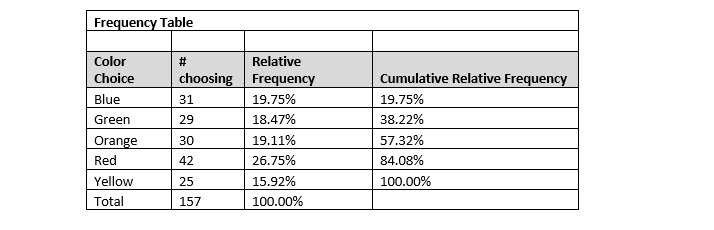
Frequency distributions display the relative frequency for each category. When all the relative frequencies are added, they sum to 1 or 100%. Cumulative relative frequencies add each category’s relative percentage to the category or categories above. The result is still 100%, but 100% is reached with the last category.

As the illustration below shows, blue and green represent 38.22% of the choices. The color choices of blue, green, orange, and red accounted for 84.08% of the choices.
Statistics lesson screenshot 2ndChapter6

Frequency Distributions for Quantitative Data

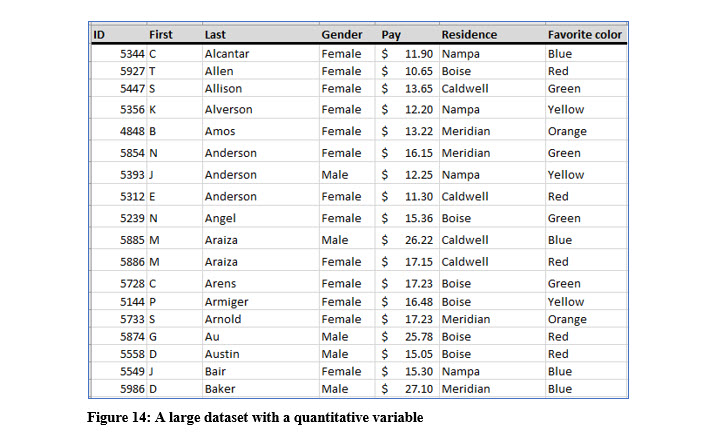
Briefly exam the data in Figure 14. Constructing frequency distributions for the variables gender, residence, and favorite color would be relatively simple tasks because there are a limited number of categories for each these variables. Counting the number of observations that fall into each category and then graphing the frequencies or placing them into a table would not be extremely time consuming and the resulting table or graph would be easy to interpret as we have seen with the favorite color frequency distribution.
Statistics lesson screenshot 2ndChapter7

Constructing a frequency distribution table for the variable pay, because there are so many different values would not provide any useful information because the number of occurrences in each pay value would often be 1. You can see a small portion of a frequency distribution of pay values in Figure 15.

Statistics lesson screenshot 2ndChapter8

To create frequency distributions from quantitative data, especially when you are using continuous variables, it is better to create categories that contain a range of values, rather than counting each value. With the example data in the above illustration, you may decide to group the data by increments of $1. Then, you could count the number of observations from $9.00 to $9.99, $10.00 to $10.99 and so on.

Rather than guessing about the range and how many categories you should use for your values, there is a standard approach in statistics. That approach uses the following steps:

1. DETERMINE K, THE NUMBER OF CLASSES (CATEGORIES)

The classes are the ranges that will include the counts. Following the previous example with the “guessed” increments, there would be 17 classes with a range of $1 because the data ranges from 10.65 to 27.10. Again, rather than guessing, there a simple formula we can use to determine the number of classes in a dataset and that depends on the number of observations in the data.

The example dataset with the names, residences, and pay rates is available on the author’s website in Excel format. It is called Pay Survey. It is not necessary to download the file, but you can use it to follow along if you like. The Pay Survey dataset contains 421 observations. The number of observations in the dataset is the key in determining how many classes to use in a frequency distribution of quantitative data.

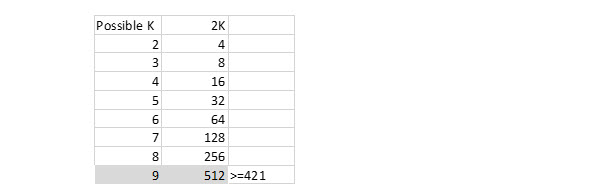
The rule of thumb in determining the number of classes, k, is 2k >= n (the number of observations). The process is shown in Figure 16 using the 421 observations in the example Pay Survey dataset.
Statistics lesson screenshot 2ndChapter9

Using this rule, we determine the proper number of classes, or categories for this dataset is 9. Again, we computed k by increasing its value until 2k is a value equal to or greater than the number of observations.

2. DETERMINE THE INTERVAL OR WIDTH

After you have determined the number of categories, k, you need to determine the width or range for each category. We used $1.00 as an example interval range. That may turn out to be correct, but there is there is a formula to determine the width or range.

To determine the range, you need to know the highest, (maximum), and lowest, (minimum), values in the dataset of the variable for which you are trying to create the frequency distribution. Unless you have downloaded the Pay Survey file, you will have to take my word that the highest value is $27.10 and the lowest value is $9.00. When you are working with a large dataset, Excel or other software program becomes very useful.
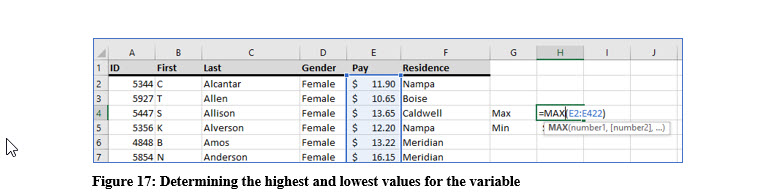
Statistics lesson screenshot 2ndChapter10

After we have determined the number of classes, k, and the highest and lowest values in the dataset, we can compute the proper width for each class. The formula we use is: I (interval) = (Highest value – Lowest Value)/k

So for this dataset, I = (27.10 – 9.00) / 9 = 2.01.

Rounding this to an interval of 2 makes it simpler and easier to work with but doing this we will need to add a class. Otherwise we will miss the values greater than $27.00

The illustration in Figure 18 shows the frequency distribution with k=10 and I = 2 using Excel’s pivot table feature. With a large dataset, counting records manually becomes very tedious.
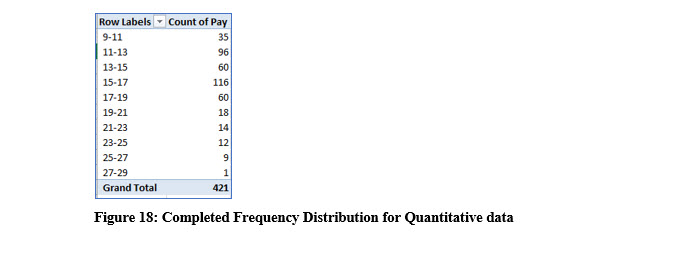
Statistics lesson screenshot 2ndChapter11

Try it in Excel:

In Excel, the CountIf() function can also be used to create a frequency distribution.
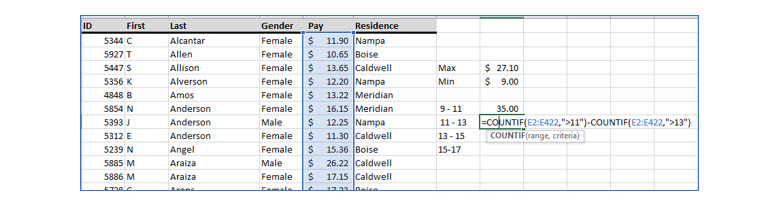
Statistics lesson screenshot 2ndChapter12

This formula is =B6-B9.

Statistics lesson screenshot 2ndChapter13

If you are familiar with Pivot tables, you may want to experiment with them for creating frequency distributions. If you are not familiar with them, there are many resources available, including several Excel workbooks I created to help you master Excel quickly and easily.

Advertisement

Next step

See the concepts demonstrated.

Continue to Watch for chapter videos and worked examples.

Go to Watch

See it explained

Watch

Choose the explanation or example that best supports your learning.

Next step

Apply what you have learned.

Use the guided questions and interactive calculator activities in Practice.

Go to Practice

Apply what you learned

Practice Chapter 2: Descriptive Statistics—Frequencies

Practice organizing data into frequency distributions and interpreting numerical summaries. Begin with the guided questions, then use the calculator and downloadable Excel files.

Launch Interactive Calculator

Guided Practice

  • For the colors blue, red, blue, green, blue, red, create a frequency and relative-frequency table.
  • Explain the difference between frequency and relative frequency.
  • For n = 421, increase k until 2^k is at least n. What number of classes is suggested?
  • Using a maximum of 27.10, a minimum of 9.00, and k = 9, compute the class width.
  • Explain why a separate class for every distinct pay value would not create a useful summary.

Challenge Yourself

  • Create a cumulative-frequency and cumulative-percentage column for a frequency table of your choice.
  • Construct two reasonable frequency distributions for the same quantitative data using different class widths. Compare their usefulness.
  • Enter 10, 11, 11, 12, 13, 14, 14, 14, 18 in the descriptive-statistics calculator and relate the mode to the frequency distribution.
  • Add an extreme value to a data set and explain how the frequency display, mean, median, range, and standard deviation change.

Check Your Understanding

  • Why are relative frequencies useful when comparing groups of different sizes?
  • When are cumulative frequencies meaningful, and when might they not be?
  • Why do quantitative data often need to be grouped into intervals?
  • What tradeoff occurs when class intervals are made very narrow or very wide?
  • How do measures of center and spread add information beyond a frequency table?

Next step

Save the materials you may need later.

Open Resources for the study sheet, spreadsheets, and related learning materials.

Go to Resources

Keep learning

Resources

Study sheets, downloadable files, companion tools, and related lessons for this chapter.

For educators

Teaching this chapter?

The Instructor tab contains objectives, teaching ideas, assessments, and a printable guide.

Open Instructor Resources

LutherMaddy.com — Helping Humans Learn

Chapter 2: Descriptive Statistics—Frequencies: Instructor Resources

Teach this lesson

Instructor Resources

Classroom-ready objectives, teaching ideas, questions, and assessment materials for this chapter.

Calculator Instructor Resources

Learning Objectives

  • Organize and summarize a set of quantitative observations.
  • Compute and interpret the mean, median, mode, minimum, maximum, and range.
  • Compute and distinguish sample and population variance and standard deviation.
  • Evaluate how unusual values affect measures of center and spread.
  • Use numerical summaries together with a visual display of the data.

Prerequisite Knowledge

  • Quantitative variables and measurement scales.
  • Basic arithmetic and order of operations.
  • Understanding of a frequency distribution.

Teaching Outline

  • Begin by ordering the observations and identifying the minimum and maximum.
  • Compare the mean, median, and mode as measures of center.
  • Use the range as an introductory measure of spread.
  • Build variance from deviations around the mean and explain why deviations are squared.
  • Compare sample and population denominators.
  • Use the calculator output and graph to discuss shape, concentration, and possible outliers.

Key Concepts

  • The mean uses every observation and is sensitive to extreme values.
  • The median is the middle ordered value and is resistant to extreme values.
  • The range is the maximum minus the minimum.
  • Variance and standard deviation describe spread around the mean.
  • Sample variance divides by n − 1; population variance divides by N.

Classroom Demonstration

  • Enter a small symmetric data set and compare its mean and median.
  • Add one very large value and observe which statistics change most.
  • Duplicate one value several times to demonstrate how a mode develops.
  • Compute the range, sample standard deviation, and population standard deviation for the same data.

Questions to Ask

  • When is the median a better description of center than the mean?
  • Can a data set have more than one mode or no mode?
  • Why is the range usually less informative than standard deviation?
  • Why do sample and population variance use different denominators?
  • Can two data sets have the same mean but very different standard deviations?

Teaching Notes

  • Ask students to predict the direction of change before adding or removing observations.
  • Emphasize that the mean and median answer different questions; neither is universally best.
  • Connect frequency distributions from Chapter 2 with the calculator’s graphical summary.
  • Use the phrase “typical distance from the mean” as an intuitive introduction to standard deviation.

Assessment Ideas

  • Have students compute a small data set by hand and verify it with the calculator.
  • Ask students to compare two data sets that have the same mean but different spreads.
  • Give students a data set with an outlier and require a recommendation of mean or median.
  • Require a brief written interpretation of the standard deviation in context.

Grading Rubric

CriterionPoints
Orders and enters the data correctly1
Computes measures of center accurately3
Computes measures of spread accurately3
Selects the appropriate sample or population measure1
Interprets the results in context2
Total10

Exam and Discussion Questions

Basic

  • For the data 4, 6, 6, 8, 11, compute the mean, median, mode, and range.
  • Explain the difference between sample standard deviation and population standard deviation.

Applied

  • Compare the data sets 10, 10, 10, 10, 10 and 2, 6, 10, 14, 18. Describe their centers and spreads.
  • A salary data set contains one extremely high executive salary. Decide whether the mean or median better represents a typical salary and explain why.

Conceptual

  • Explain why the sum of deviations from the mean is zero and why variance uses squared deviations.
  • Describe how adding the same constant to every value affects the mean and standard deviation.

Keep Exploring

Continue Learning

Explore step-by-step lessons, interactive calculators, downloadable study sheets, and practical educational resources.